K3s on AWS in 2026: 4 IAM auth methods benchmarked
TL;DR: I have 3 EC2 nodes running K3s. My pod needs to write to S3. Which AWS auth should I use? I built all four (Instance Profile, IRSA via S3, IRSA via CloudFront, IAM Roles Anywhere) on the same cluster, ran benchmarks, killed dependencies on purpose, and recorded everything that broke. Spoiler: auth method picks sub-second median delta, but blast radius differs by 100x.
The problem (and why your tutorial is wrong)
Most “K3s + AWS” tutorials show you one of two patterns:
- EC2 Instance Profile - default fallback, every pod inherits node-level AWS perms
- IRSA via S3 public bucket - the classic reece.tech 2021 pattern you’ll find replicated across 50+ blog posts
Both have problems in 2026:
- Instance Profile blast radius = whole node. Pod compromise = AWS access for every other pod on the host. CloudTrail session name is the EC2 instance ID - you can’t tell which pod made the call.
- S3 public bucket smell = AWS S3 Access Analyzer warns. Anyone with the bucket name can see your OIDC discovery doc + JWKS public keys. Not a secret, but unnecessary exposure.
There are at least two more options nobody benchmarks against each other:
- IRSA via CloudFront + custom domain - private S3 bucket, OAC, custom branding
- IAM Roles Anywhere with self-signed CA - X.509 cert auth, completely different paradigm
I built all four on the same 3-node K3s cluster, ran cold-start benchmarks, then started breaking things on purpose. Here’s what I learned.
Architecture: 4 setups at a glance
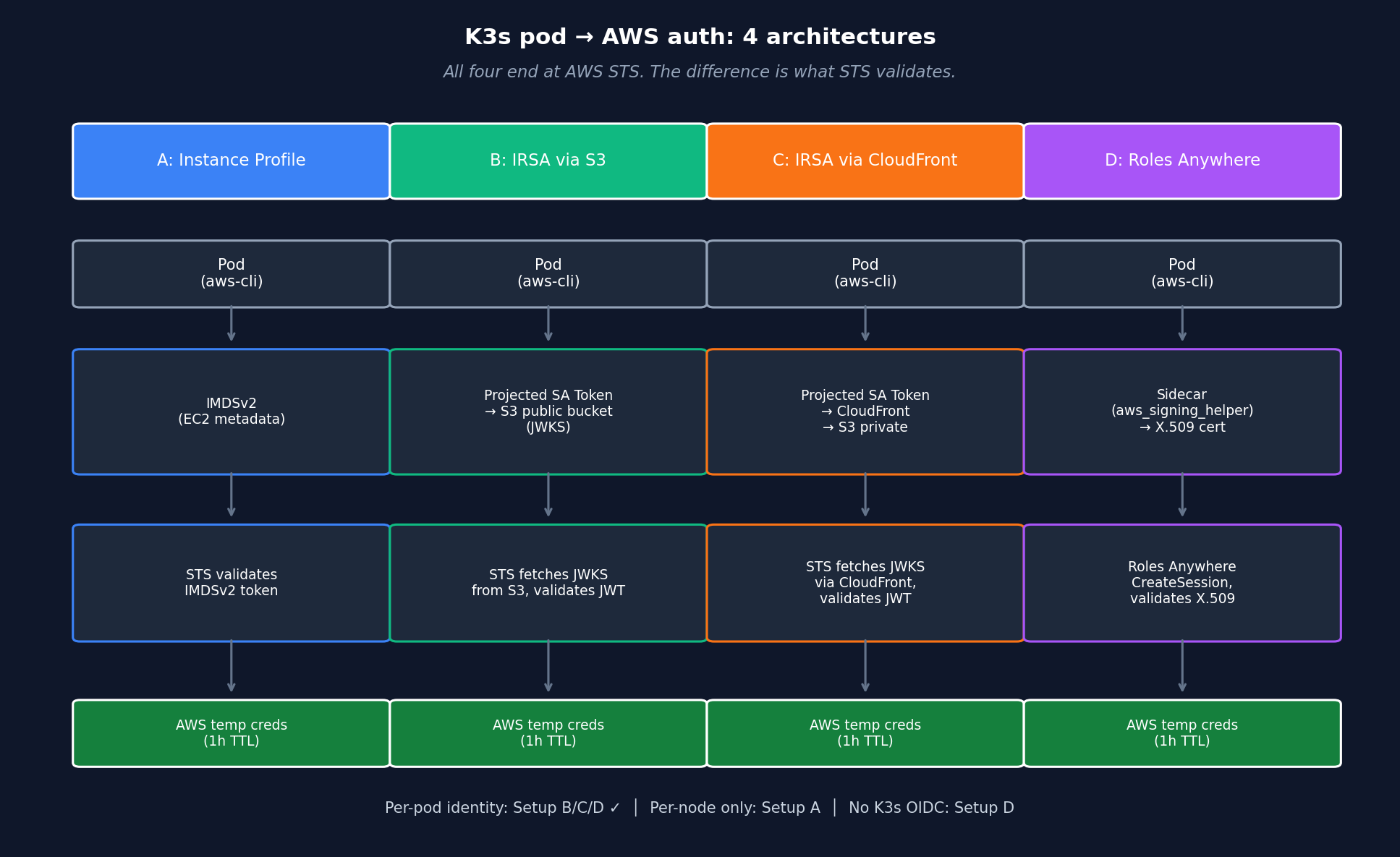
All four end at AWS STS. The difference is what AWS validates (IMDSv2 token vs OIDC JWT vs X.509 cert) and where the trust anchor sits (EC2 metadata vs OIDC provider vs Roles Anywhere Trust Anchor).
Cluster: K3s v1.35.4+k3s1 on 3x EC2 t3.medium in eu-central-1, single AZ.
| Setup | Auth pattern | Per-pod identity? | External deps |
|---|---|---|---|
| A Instance Profile | IMDSv2 fallback | NO (per-node) | none |
| B IRSA + S3 | OIDC federation | YES | S3 bucket public |
| C IRSA + CloudFront | OIDC federation | YES | S3 + CloudFront + ACM + DNS |
| D Roles Anywhere | X.509-signed CreateSession | YES | K8s Secret + CA |
Key insight before we dive in: all four ultimately call AWS STS. The difference is what AWS validates (IMDSv2 token vs OIDC JWT vs X.509 cert) and where the trust anchor sits (EC2 metadata vs OIDC provider vs Roles Anywhere Trust Anchor).
Setup A: EC2 Instance Profile (baseline)
The default. Attach IAM role to EC2, every pod on that node falls back to IMDSv2 when the SDK doesn’t find creds elsewhere.
resource "aws_iam_role" "k3s_node" {
  name = "lab-irsa-k3s-node"
  assume_role_policy = jsonencode({
    Statement = [{
      Effect = "Allow"
      Principal = { Service = "ec2.amazonaws.com" }
      Action = "sts:AssumeRole"
    }]
  })
}

resource "aws_iam_instance_profile" "k3s_node" {
  name = "lab-irsa-k3s-node"
  role = aws_iam_role.k3s_node.name
}
Pod manifest is identical to “no auth” - SDK auto-discovers via IMDSv2:
apiVersion: v1
kind: Pod
metadata:
  name: aws-test-baseline
spec:
  containers:
  - name: aws-cli
    image: amazon/aws-cli:latest
    command: ["sleep", "3600"]
ARN returned by sts:GetCallerIdentity:
arn:aws:sts::498127364509:assumed-role/lab-irsa-lab-k3s-node/i-026dc1726f1e157e9
                                                              ^^^^^^^^^^^^^^^^^^^
                                                              EC2 instance ID
The audit trail problem: session name is the instance ID, not the pod or service account. CloudTrail shows you which node made the call, not which pod. In a 100-pod cluster, you’ve lost workload-level traceability.
Pros:
- Zero config (default fallback)
- Cold start ~3.4s (we’ll see this beats IRSA by ~400ms)
- No external deps
Cons:
- Per-node permissions = blast radius is the whole host
- No per-pod IAM granularity
- Audit trail at instance level only
When to use: edge clusters with 1-2 pods, dev labs, single-tenant single-purpose nodes.
Setup B: IRSA via S3 public bucket
The classic pattern from 2021 tutorials. K3s API server signs SA tokens with an RSA key. The matching public key (JWKS) lives in a public S3 bucket. AWS STS fetches it to verify pod-issued tokens.
# Generate RSA keypair locally
openssl genrsa -out sa-signer.key 2048
openssl rsa -in sa-signer.key -pubout -out sa-signer.pub

# Build JWKS + OIDC discovery JSON (Python helper script in repo)
python gen-irsa-keys.py --issuer "https://your-bucket.s3.eu-central-1.amazonaws.com"
# Public S3 bucket - smell, intentional in Setup B
resource "aws_s3_bucket_public_access_block" "oidc" {
block_public_acls = false
block_public_policy = false
ignore_public_acls = false
restrict_public_buckets = false
}
# Dynamic TLS thumbprint - never hardcode (rotates with AWS S3 cert)
data "tls_certificate" "s3" {
url = "https://your-bucket.s3.eu-central-1.amazonaws.com"
}
resource "aws_iam_openid_connect_provider" "k3s" {
url = "https://your-bucket.s3.eu-central-1.amazonaws.com"
client_id_list = ["sts.amazonaws.com"]
thumbprint_list = [data.tls_certificate.s3.certificates[0].sha1_fingerprint]
}K3s reconfig (CP node):
# /etc/rancher/k3s/config.yaml
kube-apiserver-arg:
  - "service-account-issuer=https://your-bucket.s3.eu-central-1.amazonaws.com"
  - "service-account-signing-key-file=/etc/rancher/k3s/keys/sa-signer.key"
  - "service-account-key-file=/etc/rancher/k3s/keys/sa-signer.pub"
  - "api-audiences=sts.amazonaws.com,https://kubernetes.default.svc"
Pod manifest changes - per-pod IAM via SA annotation + projected token:
apiVersion: v1
kind: ServiceAccount
metadata:
  name: irsa-test-s3-sa
  annotations:
    eks.amazonaws.com/role-arn: arn:aws:iam::ACCT:role/lab-irsa-pod-s3
---
apiVersion: v1
kind: Pod
spec:
  serviceAccountName: irsa-test-s3-sa
  containers:
  - name: aws-cli
    image: amazon/aws-cli:latest
    env:
    - name: AWS_ROLE_ARN
      value: arn:aws:iam::ACCT:role/lab-irsa-pod-s3
    - name: AWS_WEB_IDENTITY_TOKEN_FILE
      value: /var/run/secrets/eks.amazonaws.com/serviceaccount/token
    volumeMounts:
    - name: aws-iam-token
      mountPath: /var/run/secrets/eks.amazonaws.com/serviceaccount
      readOnly: true
  volumes:
  - name: aws-iam-token
    projected:
      sources:
      - serviceAccountToken:
          audience: sts.amazonaws.com
          expirationSeconds: 86400
          path: token
Note: I deliberately skipped the eks-pod-identity-webhook. The webhook just automates this manifest. Showing it manually makes the mechanics obvious.
ARN returned:
arn:aws:sts::498127364509:assumed-role/lab-irsa-lab-irsa-pod-s3/botocore-session-1778013011
                                       ^^^^^^^^^^^^^^^^^^^^^^^^ ^^^^^^^^^^^^^^^^^^^^^^^^^
                                       Per-pod IAM role         boto3 default session name
Now we have per-pod identity - different role for different pod, different CloudTrail entry.
The catch: S3 public bucket. Anyone running curl https://your-bucket.s3.eu-central-1.amazonaws.com/.well-known/openid-configuration can read your OIDC config and JWKS. JWKS are public by design (they hold public keys, not secrets) - the issue is unnecessary public S3 exposure plus compliance noise: AWS S3 Access Analyzer flags this and your security team will ask.
Setup C: IRSA via CloudFront + custom domain
Same OIDC mechanic, better security posture. S3 bucket private, CloudFront fronts it with Origin Access Control (OAC), custom domain (oidc.lab.haitmg.pl) with ACM cert.
The setup is 3-stage with manual DNS steps in between:
Stage 1 - ACM cert (issuer creates), S3 bucket, CloudFront stub:
terraform apply -target=aws_acm_certificate.oidc \
                -target=aws_s3_bucket.oidc \
                -target=aws_cloudfront_origin_access_control.oidc \
                -target=aws_s3_object.oidc_config \
                -target=aws_s3_object.oidc_jwks
Manual DNS step: add validation CNAME (5-15 min propagation).
Stage 2 - validation passes, CloudFront deploys:
terraform apply -target=aws_acm_certificate_validation.oidc \
                -target=aws_cloudfront_distribution.oidc \
                -target=aws_s3_bucket_policy.oidc_cf_only
Manual DNS step: add CF alias CNAME (oidc.lab → dXXX.cloudfront.net).
Stage 3 - OIDC provider + IAM role:
terraform apply # fullTwo important quirks:
- ACM cert MUST be in us-east-1 for CloudFront - regardless of where your other resources live. The TF code needs an aliased provider:
provider "aws" {
  alias  = "us_east_1"
  region = "us-east-1"
}

resource "aws_acm_certificate" "oidc" {
  provider = aws.us_east_1  # not the default eu-central-1
  domain_name = "oidc.lab.haitmg.pl"
}- Reference
aws_acm_certificate_validation.cert_arn, notaws_acm_certificate.arnin the CloudFrontviewer_certificate. The validation resource blocks until the cert is ISSUED. Skip this and you getInvalidViewerCertificateerrors.
S3 bucket is now private:
resource "aws_s3_bucket_public_access_block" "oidc" {
  block_public_acls       = true   # all 4 flags TRUE
  block_public_policy     = true
  ignore_public_acls      = true
  restrict_public_buckets = true
}

resource "aws_s3_bucket_policy" "oidc_cf_only" {
  policy = jsonencode({
    Statement = [{
      Principal = { Service = "cloudfront.amazonaws.com" }
      Condition = {
        StringEquals = {
          "AWS:SourceArn" = aws_cloudfront_distribution.oidc.arn
        }
      }
    }]
  })
}
Cold start was slower than Setup B in my benchmark (3.97 s median vs 2.59 s, see numbers below). Likely CloudFront edge cache cold miss on the first JWKS fetch from each STS request vs direct S3 regional endpoint hit. The win is not performance - it’s security posture: S3 Access Analyzer happy, custom domain branding, optional WAF on CloudFront, ACM cert auto-rotation.
The cost: 3 Terraform applies, 2 manual DNS steps, 20 minutes of DNS propagation waits.
Setup D: IAM Roles Anywhere + self-signed CA
Completely different paradigm. No K8s OIDC, no S3 bucket, no CloudFront. Just X.509 cert auth.
# Self-signed CA (10 years, REQUIRES explicit basicConstraints + keyUsage extensions)
openssl req -x509 -new -nodes -key ca.key -sha256 -days 3650 \
  -addext "basicConstraints=critical,CA:TRUE" \
  -addext "keyUsage=critical,keyCertSign,cRLSign" \
  -out ca.crt -subj "/CN=lab-irsa-benchmark-ca/O=HAIT/C=PL"

# Pod cert (90 days, REQUIRES specific extensions for AWS Roles Anywhere)
cat > pod-cert.ext <<EOF
basicConstraints=critical,CA:FALSE
keyUsage=critical,digitalSignature
extendedKeyUsage=clientAuth
subjectKeyIdentifier=hash
authorityKeyIdentifier=keyid,issuer
EOF

openssl x509 -req -in pod-cert.csr -CA ca.crt -CAkey ca.key -CAcreateserial \
  -out pod-cert.crt -days 90 -sha256 -extfile pod-cert.ext
Three landmines I stepped on, in order:
-
AWS Private CA costs $50/mo for short-lived mode, $400/mo for general mode. Self-signed CA = $0 and AWS Roles Anywhere accepts external CA via Trust Anchor.
-
Default
openssl req -x509doesn’t addbasicConstraints CA:TRUEto the CA cert. AWS rejects withIncorrect basic constraints for CA certificate. Add-addext "basicConstraints=critical,CA:TRUE". -
Default
openssl x509 -reqdoesn’t addkeyUsageorextendedKeyUsageto the leaf cert. AWS rejects withUntrusted certificate. Insufficient certificate. The extfile above adds them.
Trust Anchor + Profile + Role:
resource "aws_rolesanywhere_trust_anchor" "lab_ca" {
  name = "lab-irsa-ca"
  source {
    source_data {
      x509_certificate_data = file("ca/ca.crt")
    }
    source_type = "CERTIFICATE_BUNDLE"
  }
}

resource "aws_iam_role" "ra_pod" {
  assume_role_policy = jsonencode({
    Statement = [{
      Principal = { Service = "rolesanywhere.amazonaws.com" }
      Action = ["sts:AssumeRole", "sts:TagSession", "sts:SetSourceIdentity"]
      Condition = {
        StringEquals = {
          "aws:PrincipalTag/x509Subject/CN" = "lab-pod-1"
        }
      }
    }]
  })
}

resource "aws_rolesanywhere_profile" "lab_pod" {
  role_arns = [aws_iam_role.ra_pod.arn]
  duration_seconds = 3600
}
Pod has 3 containers (initContainer downloads helper, sidecar runs it, app talks to it):
spec:
  initContainers:
  - name: download-helper
    image: amazon/aws-cli:latest
    command: ["sh", "-c"]
    args:
      - |
        curl -sSL "https://rolesanywhere.amazonaws.com/releases/1.8.2/X86_64/Linux/Amzn2023/aws_signing_helper" \
          -o /shared/aws_signing_helper
        chmod +x /shared/aws_signing_helper

  - name: setup-aws-config
    image: amazon/aws-cli:latest
    command: ["sh", "-c"]
    args:
      - |
        cat > /aws-config/config <<EOF
        [default]
        credential_process = /shared/aws_signing_helper credential-process \
          --certificate /certs/cert.pem --private-key /certs/key.pem \
          --trust-anchor-arn ARN --profile-arn ARN --role-arn ARN
        EOF

  containers:
  - name: aws-cli
    image: amazon/aws-cli:latest
    env:
    - name: AWS_CONFIG_FILE
      value: /aws-config/config
Why credential-process and not serve (IMDSv2 mock)?
The helper has two modes. serve exposes an IMDSv2-compatible endpoint on localhost:9911. AWS docs describe both as supported.
In my lab (helper 1.8.2 + amazon/aws-cli:latest 2.34.43 + K3s 1.35.4), serve mode returned 400 Bad Request on the listing endpoint (/latest/meta-data/iam/security-credentials/), which made botocore overflow on _evaluate_expiration:
File "awscli/botocore/utils.py", line 640, in _evaluate_expiration
OverflowError: date value out of range
credential-process was reliable. Your mileage may vary - check helper version and SDK combination before assuming serve works. If it does for you, serve saves a config file mount.
ARN returned:
arn:aws:sts::498127364509:assumed-role/lab-irsa-lab-roles-anywhere-pod/228cf3882735f2c00354ea7571dcf6680666dca0
                                                                       ^^^^^^^^^^^^^^^^^^^^^^^^^^^^^^^^^^^^^^^
                                                                       X.509 cert serial number
Best audit trail of the four setups. Session name = cert serial = unique per cert issuance = correlatable with your PKI logs.
Trade-off: sidecar adds ~50MB RAM per pod. Each AWS API call forks a subprocess (credential-process runs aws_signing_helper on demand). Cold start is ~85% slower than Setup A.
Benchmark: cold start
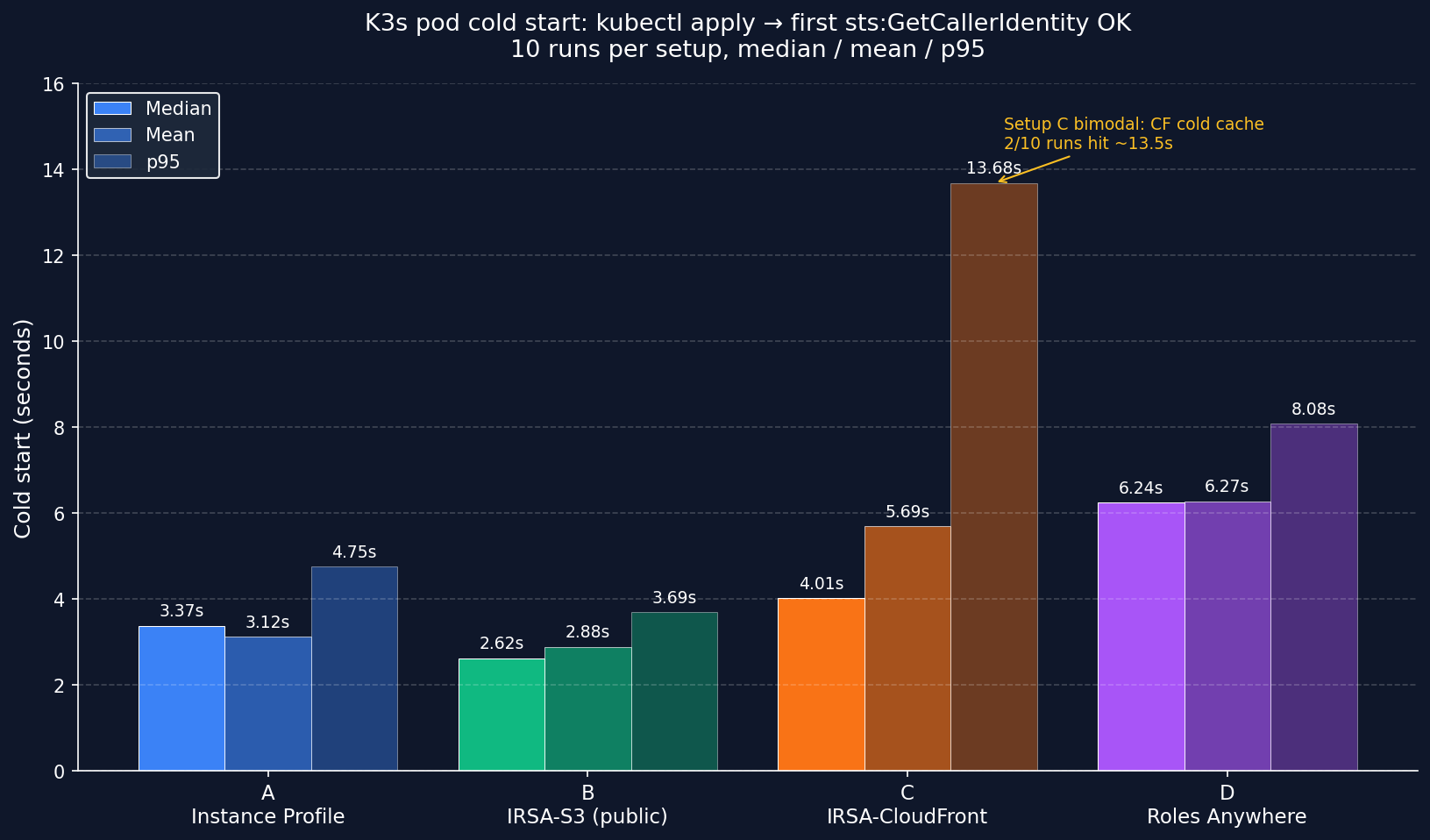
10 runs per setup, measuring kubectl apply pod to first successful aws sts get-caller-identity.
Methodology:
- K3s
v1.35.4+k3s1on 3x EC2t3.mediumineu-central-1a - Ubuntu 24.04 LTS noble (AMI
ami-0596cf3199908321b) - Container image:
amazon/aws-cli:latest(resolved to 2.34.43) - Note on image pull: because the tag is
:latest, Kubernetes defaultsimagePullPolicytoAlways, notIfNotPresent. Image layers were cached after the first run on each node, but kubelet still performed registry digest resolution on every pod create. Cold-start numbers therefore include some image-pull / registry overhead - they are not pure auth-method timings. To isolate auth-only overhead in your own runs, setimagePullPolicy: IfNotPresentexplicitly in the pod spec. - Each iteration:
kubectl delete pod --grace-period=0 --force→ wait until gone →kubectl apply→ pollaws sts get-caller-identityevery 200ms until"Account"appears in output - Total wall time =
kubectl applyto first successful STS response - 10 runs per setup, 40 runs total. Stats computed via Python
statistics.median()and standardp95 = sorted[int(n*0.95)] - Raw CSV (40 runs, all 4 setups): cold-start-results-final.csv · Aggregated stats: cold-start-summary.csv
| Setup | Median | p95 | Mean |
|---|---|---|---|
| A Instance Profile | 3.18 s | 4.75 s | 3.12 s |
| B IRSA-S3 (public bucket) | 2.59 s | 3.69 s | 2.88 s |
| C IRSA-CloudFront | 3.97 s | 13.68 s | 5.69 s |
| D Roles Anywhere | 6.14 s | 8.08 s | 6.27 s |
Four insights:
-
Setup C has the worst p95 (13.68 s) and highest variance. Two of 10 runs hit ~13.5 s vs the others sitting around 2.3-5.5 s. Hypothesis: CloudFront edge cache cold misses for the JWKS fetch from AWS STS - first request pays the full origin fetch latency; subsequent requests use cached JWKS at the edge until TTL expires. Caveat: I did not have visibility into AWS STS internal JWKS fetch timing, so this is inferred from distribution shape, not directly observed in CloudFront/STS logs. If your IRSA pod creation is bursty (CronJob spawning every minute), expect this variance in Setup C, not in Setup B.
-
B vs C median delta = 1.38 s (B faster). Setup B and C share the same OIDC mechanic but differ in where AWS STS fetches JWKS from: regional S3 endpoint (B) vs CloudFront edge (C). On B, every STS validation hits the same regional endpoint with consistent latency. On C, you’re paying CDN cold cache misses on first hit. Don’t read “B is faster” as “always pick B” - the security trade-off (public bucket vs private+OAC) outweighs the median delta for most prod workloads.
-
A vs C median delta = 790 ms (~25%). OIDC federation does cost noticeable overhead vs Instance Profile fallback, but most cold-start time is still pod scheduling, image pull, and registry resolution - not the auth handshake itself.
-
Setup D is 93% slower than A because of two factors: initContainer downloads ~25 MB helper binary at pod start, and every AWS API call forks a
credential-processsubprocess. Optimization: bake helper into a custom Dockerfile (FROM amazon/aws-cli + RUN curl helper). Eliminates init download, saves ~2 s. -
With n=10, take medians, not means. Setup C’s mean (5.69 s) is dragged up by 2 cold-cache outliers. Median (3.97 s) is more representative. Real production cold-start distribution is bimodal for CDN-fronted IRSA - plan capacity around p95, not median.
Failure scenarios: what breaks when
I deliberately broke things and recorded what happened. Here’s the matrix:
Test setup detail for issuer change: I changed K3s service-account-issuer from S3 (Setup B’s expected) to CloudFront (Setup C’s expected). After the change, K3s signs SA tokens with iss: <CloudFront URL>. Setup B’s IAM trust policy still expects iss: <S3 URL> → mismatch → AccessDenied. Setup C now matches → OK. The relationship is symmetric - if I had gone the other direction (CF→S3), Setup C would have failed and B would have worked. The lesson is “issuer change breaks any IRSA pod whose trust policy references the old issuer”, regardless of direction.
| ID | Failure scenario | A | B | C | D | Cached creds save? |
|---|---|---|---|---|---|---|
| F-01 | K3s issuer change (B→C) | ✓ | ✗ | ✓ | ✓ | NO |
| F-02 | Clock skew +5h on node | ✗ | ✗ | ✗ | ✗ | NO |
| F-03 | K8s Secret deleted (pod cert) | n/a | n/a | n/a | ⚠️→✗ | YES (existing only) |
| F-04 | IAM Role deleted mid-flight | n/a | n/a | ⚠️→✗ | n/a | YES (1h grace) |
| F-05 | OIDC Provider deleted in IAM | n/a | n/a | ⚠️→✗ | n/a | YES (1h grace) |
| F-06 | Trust policy :sub mismatch | n/a | n/a | ✗ | n/a | NO |
Legend: ✓ unaffected · ✗ fails immediately · ⚠️→✗ degraded (cached creds save existing pods 1h, then fail) · n/a scenario doesn’t apply
Per-failure detail
F-01 - K3s issuer change (B→C): Setup B’s IAM trust policy expects iss: <S3 URL>, but K3s now signs SA tokens with iss: <CloudFront URL>. Token rejected. Setup C matches new issuer → OK. Setup A unaffected (Instance Profile, no OIDC). Setup D unaffected (cert auth). Recovery: update all trust policies to new issuer URL OR rollback K3s. Safe migration pattern: blue-green dual-issuer (maintain both OIDC providers during cutover).
F-02 - Clock skew on node: All setups fail. AWS STS rejects SigV4 signatures with timestamp >15min off server clock. Setup A: SignatureDoesNotMatch. Setup B/C: token iat/exp invalid. Setup D: Invalid signature on CreateSession. Recovery: systemctl restart chrony → 5s NTP resync, all setups auto-recover without pod restart.
F-03 - K8s Secret deleted: Setup D only. Existing pod with cert already mounted via projected volume keeps running on cached creds. New pod attempting to start: MountVolume.SetUp failed for volume "cert" : secret not found. Recovery: kubectl create secret again, kubelet auto-retries mount.
F-04 - IAM Role deleted mid-flight: Setup C only (illustrative; same applies to B). Existing pod has 1h-cached AssumeRoleWithWebIdentity creds and keeps working until refresh. New pod: AccessDenied: Not authorized to perform sts:AssumeRoleWithWebIdentity. Recovery: terraform apply re-creates role + policy attachment.
F-05 - OIDC Provider deleted in IAM: Setup C only. Existing pod cached. New pod: InvalidIdentityToken: No OpenIDConnect provider found in your account for https://oidc.lab.haitmg.pl. Notably different error code than F-04 (role deleted) - useful for fast triage. Recovery: terraform apply re-creates OIDC provider.
F-06 - Trust policy :sub condition mismatch: Setup C only. Pod with wrong SA name fails immediately: AccessDenied. Same error code as F-04 but different cause - the trust policy condition system:serviceaccount:default:irsa-test-cf-sa doesn’t match token claim. Recovery: fix SA name in pod spec OR fix trust policy condition.
Three meta-insights:
1. Cached creds = grace period (4 of 6 scenarios).
- AssumeRoleWithWebIdentity creds cache for 1 hour by default
- Existing pod survives role deletion, OIDC deletion, K8s Secret deletion (for Setup D)
- New pods (CronJob spawning every minute) hit the failure immediately
- First casualty: short-lived workloads.
2. Error message decoder ring:
SignatureDoesNotMatch→ clock skewInvalidIdentityToken: No OpenIDConnect provider found→ OIDC provider deletedAccessDenied: Not authorized to perform sts:AssumeRoleWithWebIdentity→ role deleted OR trust policy mismatch (must check both!)MountVolume.SetUp failed→ K8s Secret missingCredentials were refreshed, but still expired→ clock skew (SDK’s confused way of saying it)
3. Recovery time differs wildly:
- NTP fix: 5 seconds (
systemctl restart chrony) - TF apply re-create: ~30 seconds (role, OIDC provider)
- K8s Secret recreate + kubelet retry: ~5 seconds
The most damaging failure is K3s issuer change because it’s instant for all existing IRSA pods and recovery requires either rolling back the issuer or updating every trust policy. Blue-green issuer rollout is the only safe migration pattern.
Cost reality
I expected meaningful cost differences. There aren’t any.
Lab cost (3-day run including troubleshooting): ~$5 total. EC2 dominates ($0.0418/h × 3 nodes × ~24h = ~$3). Everything else fits in free tiers.
Production projection (100 pods, 24/7, ~10 AWS API calls/h per pod):
| Setup | Monthly cost | Comment |
|---|---|---|
| A Instance Profile | $0 | Built into EC2 |
| B IRSA-S3 public | ~$0.05 | 72k S3 GETs/mo, free tier covers |
| C IRSA-CloudFront | ~$0.05 | 72k CF requests, free tier 10M covers |
| D Roles Anywhere | $0 | No service charge for CreateSession |
Cost is never the deciding factor. Engineering time is - Setup C took me 30 minutes the first time (DNS waits), Setup D took 60 minutes (5 different cert/version errors). At $200/h engineer rate, that’s $200+ in invisible cost per first deploy.
The hidden trap: AWS Private CA in Roles Anywhere general mode = $400/mo. Don’t fall for that. Self-signed CA is a feature, not a workaround.
Decision matrix
Edge cluster with no public OIDC issuer (AWS access via VPC endpoints or NAT)
  → Instance Profile (Setup A). Skip the rest.

Multi-tenant K3s in prod, blast radius matters
  → IRSA via CloudFront (Setup C). Sub-second median cold-start cost is irrelevant for long-running workloads.

Mix of K8s and non-K8s workloads (VMs, on-prem servers)
  → IAM Roles Anywhere (Setup D). One auth pattern across everything.

Existing corporate PKI (Microsoft AD CS, Vault PKI, EJBCA)
  → IAM Roles Anywhere (Setup D). Reuse what you have.

Air-gapped cluster with no public OIDC issuer
  → IAM Roles Anywhere (Setup D). Cert distribution can be offline.

GitOps-managed cluster with frequent Secret churn
  → AVOID Setup D. K8s Secret = critical path dependency.

Short-lived CronJob workloads (creds churn every minute)
  → Setup A or D. IRSA's 1h cache is wasted on short pods.

You read about IRSA on someone's 2021 blog and want to copy it
  → Setup B with S3 public bucket. **Don't.** Use C with CloudFront.
Conclusion
My pick for production self-hosted K3s: Setup C (IRSA via CloudFront). Per-pod identity, no S3 public bucket smell, and the 30-minute first deploy is one-time pain.
My pick for hybrid (K8s + non-K8s) prod: Setup D (Roles Anywhere). One mental model for cert auth across containers, VMs, and lambdas.
My pick for “I’m just learning”: Setup A (Instance Profile). Skip the OIDC complexity until you have a multi-pod cluster that actually needs per-pod IAM.
What this lab convinced me of:
- Auth method matters less than people think for cold start (sub-second median delta, $0 cost difference for typical workloads)
- Failure mode coverage matters way more than auth pattern complexity
- Self-signed CA for Roles Anywhere is the unlock - $50-400/mo savings vs AWS Private CA
- Tutorials from 2021 are subtly broken in 2026 (awscli v1 EOL, helper IMDSv2 mock broken, openssl version skews)
Reproduce this lab
Full Terraform stacks, K8s manifests, helper scripts, raw benchmark CSVs, and step-by-step runbooks are public on GitHub:
github.com/gebalamariusz/lab-irsa-benchmark
What’s in the repo:
- 4 Terraform stacks (
01-baselinethrough04-roles-anywhere) - K8s manifests for each setup’s test pod (with manual projected SA token, no Pod Identity Webhook required)
- Cold start benchmark scripts (PowerShell + bash)
- Self-signed CA + cert generation script with all required X.509 v3 extensions for AWS Roles Anywhere
- Raw benchmark CSVs and chart generator (matplotlib)
Cost to reproduce: ~$3-5 if you run all 4 setups for a few hours and destroy.
What I’m NOT covering (yet)
- EKS Pod Identity (newer than IRSA, no projected token, ~simpler) - separate post coming
- EKS Auto Mode with Karpenter integration - haven’t benchmarked
- VPC Lattice + IAM auth for service-to-service - different problem space
If you found this useful, those are next.
Acknowledgments
This is a follow-up to my AWS Network Firewall vs Palo Alto VM-Series benchmark and AWS Bedrock AgentCore network mode analysis. Same methodology: build it, break it, measure it.
If your team needs help with AWS security audit (IAM, OIDC federation, Roles Anywhere setup review), I run HAIT Consulting - book a 20-min triage call.