AWS Bedrock AgentCore: VPC Mode Still Leaks DNS After Unit 42 Disclosure
Disclosure: I am the author of cloud-audit, referenced in the audit script section.
On April 7, 2026, Palo Alto Networks Unit 42 published research about a DNS exfiltration vector in AWS Bedrock AgentCore Code Interpreter, completing a responsible disclosure that began in November 2025. AWS shipped fixes during the disclosure window, including documentation updates and MMDSv2 defaults from February 14, 2026. By the time the post went public, SANDBOX mode was tightened. But VPC mode without Route 53 Resolver DNS Firewall remains vulnerable to the same attack vector (verified April 26, 2026).
Out of natural curiosity (and because I enjoy witnessing such cases), I spent six hours running all relevant AgentCore network modes. I tested the exact same DNS exfiltration method in each. I used simple Python scripts and real DNS queries. In this post, I describe what I found.
TL;DR: SANDBOX mode has been heavily tightened, PUBLIC is wide open, and VPC mode without Route 53 Resolver DNS Firewall is still vulnerable.
Why this matters now
Amazon Bedrock AgentCore was announced as preview on July 16, 2025 at AWS Summit New York and reached general availability on October 13, 2025. The managed service enables running production-scale AI agents with seven primitives: Runtime, Memory, Observability, Identity, Gateway, Browser, and Code Interpreter.
The Code Interpreter primitive aims to run code (mostly generated by LLM) in an isolated sandbox. However, an asterisk is needed to properly understand what “isolation” means, as the documentation can be a bit misleading.
On April 7, 2026, Unit 42 (Palo Alto Networks) published research showing that in SANDBOX mode, the Code Interpreter in AgentCore wasn’t as isolated as one might think. It could resolve DNS names for external domains and also had access to S3. No CVE was assigned because the behavior was classified as documented service behavior rather than an unintended vulnerability. Therefore, AWS recommended using VPC mode and configuring Route 53 Resolver DNS Firewall.
As a Palo Alto Networks practitioner, I felt compelled to verify this finding and test whether the recommended configuration actually closed the attack vector.
Lab setup at a glance
- Region: eu-central-1 (Frankfurt). AgentCore is GA in us-east-1, us-west-2, ap-southeast-2, eu-central-1 since preview launch.
- Account: my own. Disposable VPC, dedicated IAM role with minimum permissions.
- Tooling: AWS CLI 2.34.37 (older versions before 2.13 have no
bedrockcommand), Python 3.10, boto3 1.42.96, thebedrock-agentcoreSDK 1.6.4. - Cost: $0.08 total for the entire lab. Code Interpreter active execution priced at $0.0895 per vCPU-hour and $0.00945 per GB-hour.
- Time: roughly six hours including troubleshooting and screenshots.
The first surprise: AgentCore Code Interpreter has three network modes, not two
Vendor practitioner coverage of the disclosure consistently described two modes. Unit 42 talked about “Sandbox” and “VPC mode.” AWS Bedrock blog posts about the newer AgentCore Harness use “PUBLIC” and “VPC” (a different API for the Runtime primitive). The Code Interpreter API reference itself does list three valid values for networkMode (PUBLIC | SANDBOX | VPC), but the distinction between PUBLIC and SANDBOX was not surfaced in any practitioner-facing writeup I could find.
When I ran aws bedrock-agentcore-control create-code-interpreter help, the CLI confirmed the same three:
--network-configuration networkMode possible values:
  * PUBLIC
  * SANDBOX
  * VPC
Three is not two. PUBLIC and SANDBOX are distinct, despite being conflated across vendor blogs and even some AWS documentation. This matters because the network behavior of each is meaningfully different, as the lab will show.
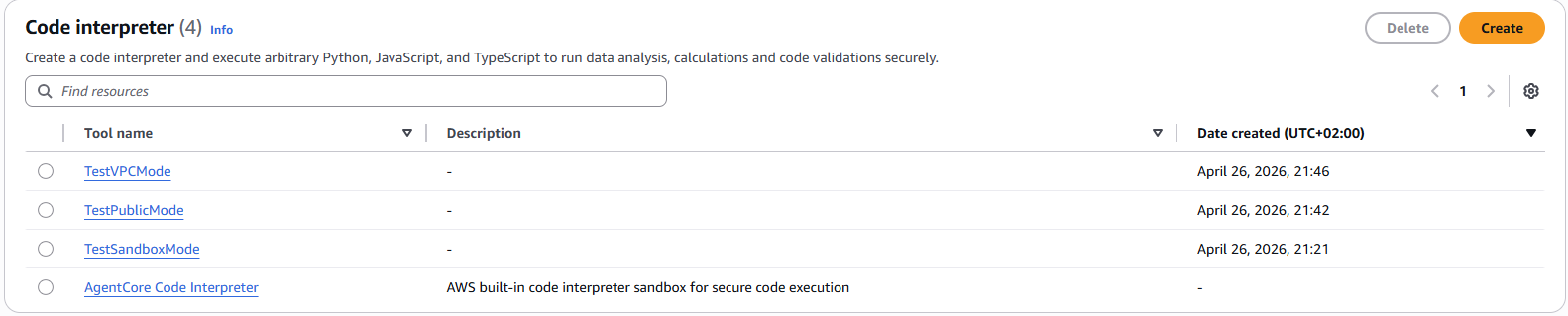
A bonus finding from the same console screen: there is also a fourth, AWS-built-in Code Interpreter that does not appear in list-code-interpreters API responses. Anyone using AWS defaults instead of creating custom resources will be invisible to API-based audit scripts. I will come back to this in the audit section.
Test methodology
For each network mode I created a Code Interpreter, started a session, and ran the same Python code via invoke_code_interpreter. Note that this method exists in the boto3 SDK but is not exposed in the AWS CLI, which is itself a limitation worth documenting.
The test code attempted four classes of network operations:
- DNS resolution for AWS service hostnames (
bedrock-agentcore.eu-central-1.amazonaws.com,s3.eu-central-1.amazonaws.com) and external domains (google.com, an attacker-controlled lookup target). - TCP connect on port 443 to the same set of hostnames.
- AWS API calls via boto3 (
sts.get_caller_identityas canary). - Instance Metadata Service v1 and v2 reachability.
I ran the same script in SANDBOX, PUBLIC, and VPC modes. What follows is the empirical truth.
SANDBOX mode: more isolated than Unit 42 reported
Unit 42’s April 7 disclosure stated that Sandbox mode permitted DNS resolution to external domains. By the time of public disclosure, in my lab on April 26, that was no longer the case.
{
  "dns_resolution": {
    "google.com": {"resolved": false, "error": "Name or service not known"},
    "github.com": {"resolved": false, "error": "Name or service not known"}
  },
  "http_requests": {
    "https://google.com": {"error": "Name or service not known"}
  },
  "metadata_service": {
    "http://169.254.169.254/latest/meta-data/": {"reachable": false, "error": "HTTP Error 401"},
    "http://169.254.169.254/latest/api/token": {"reachable": true, "status": 200}
  }
}
External DNS resolution failed. So did all external HTTP. The MMDSv1 endpoint returned 401 because new agents default to MMDSv2 only since February 14, 2026 (MMDS is Firecracker’s microVM Metadata Service, the microVM-specific equivalent of EC2 IMDS).
I ran a follow-up test to characterize what SANDBOX actually allows:
{
  "aws_endpoints_dns": "all 4 resolve (s3, bedrock, sts, agentcore)",
  "aws_endpoints_tcp": {
    "s3.eu-central-1.amazonaws.com": {"connected": true},
    "bedrock.eu-central-1.amazonaws.com": {"connected": false, "error": "Network unreachable"},
    "bedrock-agentcore.eu-central-1.amazonaws.com": {"connected": false, "error": "Network unreachable"},
    "sts.eu-central-1.amazonaws.com": {"connected": false, "error": "Network unreachable"}
  },
  "aws_api_call": {"success": false, "error": "Could not connect to STS endpoint"}
}
As observed on April 26, SANDBOX behavior is a tight allow-list: AWS service hostnames resolve to public IPs, but TCP only opens to the S3 endpoint. STS, Bedrock, and bedrock-agentcore endpoints all return “Network unreachable.” External DNS resolution fails. MMDSv2 token endpoint stays reachable.
Based on what is reachable in SANDBOX mode (MMDSv2 token + S3 endpoint), an attacker compromising the agent through prompt injection could theoretically chain credential theft with S3 PUT exfiltration to an attacker-controlled bucket, provided the execution role has S3 permissions on that bucket. I did not verify this chain end-to-end in lab. The defense for this is IAM scoping, not network controls.
PUBLIC mode: full internet access
PUBLIC mode is a different animal:
{
  "dns_resolution": {
    "google.com": "142.251.127.101",
    "haitmg.pl": "46.224.198.126"
  },
  "external_tcp": {
    "google.com:443": {"connected": true},
    "1.1.1.1:443": {"connected": true}
  },
  "aws_api_call": {
    "success": true,
    "arn": "arn:aws:sts::REDACTED:assumed-role/HarnessLabExecutionRole/BedrockAgentCore-01KQ5N2HV7ZZ59T56MSSYB34R8"
  }
}
DNS resolves anything. TCP opens to anywhere. STS calls succeed and return the assumed-role identity. PUBLIC mode is essentially Lambda with internet access plus AWS API reach.
PUBLIC is the dangerous default-feeling option. If someone reads “use a Code Interpreter” in a tutorial and picks PUBLIC because it sounds reasonable, they have given the agent full internet egress. For workloads that process untrusted user input (customer support emails, document uploads, web scrapes), PUBLIC mode is a prompt-injection-to-data-exfiltration pipeline waiting to happen.
The Unit 42 disclosure on April 7 may actually have described PUBLIC mode behavior under the older “Sandbox” label, given how cleanly today’s PUBLIC mode matches their original claims.
VPC mode: the paradox that broke my assumptions
I expected VPC mode to be the most isolated. The opposite was true for one specific dimension.
I created the VPC mode Code Interpreter pointing at my lab VPC, two private subnets, and one security group with default-allow-outbound. The first invoke timed out after 60 seconds with ReadTimeoutError. The second one too. The third also.
The first cause was the security group. AgentCore VPC mode creates ENIs of type agentic_ai (an undocumented interface type, tagged with AmazonBedrockAgentCoreManaged: true). The CI’s ENIs need to talk to the VPC endpoints’ ENIs, and they all share the same security group. Without a self-referencing inbound rule on TCP 443, traffic is dropped.
aws ec2 authorize-security-group-ingress \
  --group-id $SG_ID \
  --protocol tcp \
  --port 443 \
  --source-group $SG_ID
After adding the rule, invokes started succeeding.

With aggressive socket timeouts (socket.setdefaulttimeout(1)), I could finally see VPC mode network behavior:
{
  "dns_aws_vpce": {"ok": true, "result": "10.99.2.111"},
  "dns_aws_other": {"ok": true, "result": "16.12.32.17"},
  "dns_external": {"ok": true, "result": "142.251.127.101"},
  "tcp_vpce_agentcore": {"ok": true, "result": "ok"},
  "tcp_s3_no_endpoint": {"ok": false, "error": "timed out"},
  "tcp_external": {"ok": false, "error": "timed out"}
}
Two findings stand out.
First, DNS for bedrock-agentcore.eu-central-1.amazonaws.com resolves to 10.99.2.111, an internal IP from one of my subnets. PrivateDNS on the VPC endpoint works. AWS service traffic is going through my VPCE.
Second, and this is the surprising part: dns_external resolved. google.com came back as 142.251.127.101 from inside a VPC mode Code Interpreter that has no Internet Gateway, no NAT Gateway, and no route to the outside world.
Why this happens: DNS in a VPC, by default, goes to AmazonProvidedDNS (the .2 address in the VPC CIDR). AmazonProvidedDNS is a recursive resolver that will resolve any hostname for you, regardless of whether your VPC has internet egress. The DNS query itself travels as UDP from the resolver to upstream nameservers. The agent gets back an A record, but TCP to that IP fails because the VPC has no internet gateway. DNS exfiltration does not require TCP. The DNS query itself (UDP/53) is the exfiltration channel, encoded as a subdomain name (e.g. BASE32SECRET.attacker-controlled.test) routed through DNS to an attacker-controlled authoritative server. I did not stand up a malicious DNS server to verify the chain end-to-end, but the path is open at every layer the lab measured.
This is the same attack class Unit 42 described, but in VPC mode it survives the network architecture that practitioners assume locks the agent down.
The fix: Route 53 Resolver DNS Firewall
Route 53 Resolver DNS Firewall filters outbound DNS queries that route through the VPC Resolver. It supports allow-list and deny-list rule patterns. Pricing is $0.60 per million queries for the basic tier, and $0.16 per hour per VPC association if you want the Advanced rules that detect DNS Tunneling and Domain Generation Algorithms.
DNS Firewall is the right tool for this specific problem (DNS-layer filtering before queries leave the VPC). For deeper packet inspection or HTTP/TLS-layer egress controls, you would pair it with AWS Network Firewall - I covered the trade-offs in AWS Network Firewall vs Palo Alto VM-Series.
I configured a minimal rule group:
# Domain list of allowed domains
aws route53resolver create-firewall-domain-list --name agentcore-allow
aws route53resolver update-firewall-domains \
  --firewall-domain-list-id $ALLOW_LIST_ID \
  --operation ADD \
  --domains "*.amazonaws.com" "amazonaws.com"

# Catch-all block list
aws route53resolver create-firewall-domain-list --name agentcore-block-all
aws route53resolver update-firewall-domains \
  --firewall-domain-list-id $BLOCK_LIST_ID \
  --operation ADD \
  --domains "*"

# Rule group with two rules: allow priority 100, block priority 200
aws route53resolver create-firewall-rule-group --name agentcore-rg
aws route53resolver create-firewall-rule \
  --firewall-rule-group-id $RG --firewall-domain-list-id $ALLOW_LIST_ID \
  --priority 100 --action ALLOW
aws route53resolver create-firewall-rule \
  --firewall-rule-group-id $RG --firewall-domain-list-id $BLOCK_LIST_ID \
  --priority 200 --action BLOCK --block-response NXDOMAIN

# Associate to VPC
aws route53resolver associate-firewall-rule-group \
  --firewall-rule-group-id $RG --vpc-id $VPC_ID --priority 101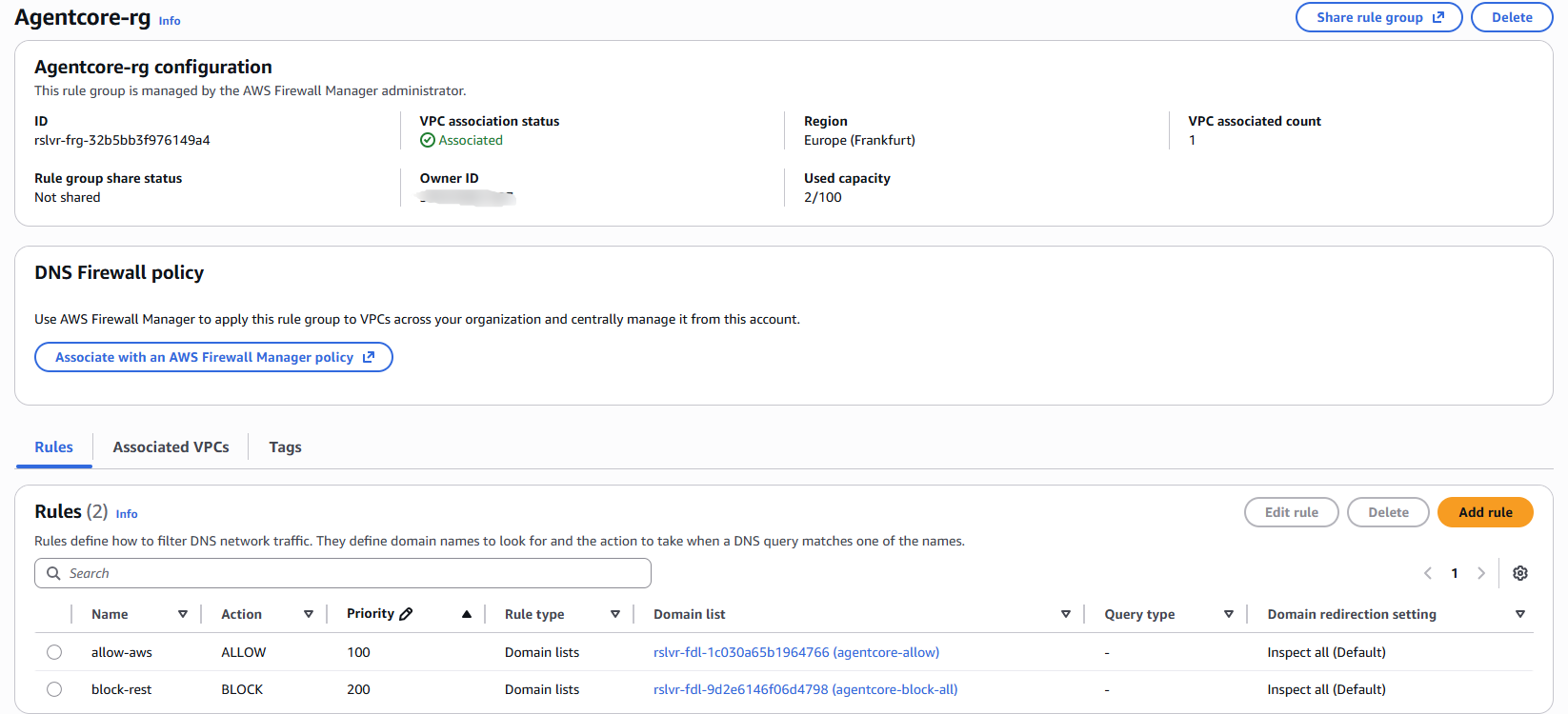
Then I re-ran the same VPC mode test:
{
  "dns_aws_vpce": {"ok": true, "result": "10.99.2.111"},
  "dns_aws_other": {"ok": true, "result": "3.5.139.187"},
  "dns_external": {"ok": false, "error": "Name or service not known"},
  "tcp_vpce_agentcore": {"ok": true, "result": "ok"},
  "tcp_s3_no_endpoint": {"ok": false, "error": "timed out"},
  "tcp_external": {"ok": false, "error": "Name or service not known"}
}
Same agent. Same code. Same VPC. The only change is DNS Firewall associated. External DNS queries now return NXDOMAIN. The exfiltration channel is closed. AWS service hostnames still resolve because they match the allow list pattern *.amazonaws.com.
This is the one piece of evidence I could not find anywhere else when researching this topic: the same agent, same test, run before and after applying Route 53 Resolver DNS Firewall, captured from one AWS account. The leak is real, and the fix works.
Defense matrix
The four AgentCore network configurations and their suitability for untrusted input, based on lab tests in eu-central-1 on April 26, 2026, are summarized below:
| Mode | TCP egress | DNS egress | Suitable for untrusted input? |
|---|---|---|---|
| PUBLIC | full internet | full | No |
| SANDBOX (post-April-patch) | S3 endpoint only | AWS allow-list | Yes for many cases |
| VPC (no IGW, no DNS Firewall) | only via VPCEs | open | No (DNS exfil possible) |
| VPC + DNS Firewall (allow-list) | only via VPCEs | filtered | Yes |
If you process customer input, document uploads, or any untrusted data through a Code Interpreter, my recommendation is VPC mode plus Route 53 Resolver DNS Firewall with a tight allow list. SANDBOX is acceptable for a narrower set of cases now that AWS has tightened it.
The audit script and its one limitation
cloud-audit, the open-source AWS scanner I maintain, will add AgentCore PUBLIC mode detection in v2.1.0. Until then, here is a thirty-line Python script that scans all four AgentCore regions and classifies each Code Interpreter by network mode:
import boto3
import sys

REGIONS = ["us-east-1", "us-west-2", "ap-southeast-2", "eu-central-1"]
INSECURE = ["PUBLIC"]

def classify(mode):
    if mode in INSECURE:
        return "INSECURE"
    if mode == "SANDBOX":
        return "WARN"
    if mode == "VPC":
        return "OK"
    return "UNKNOWN"

insecure_count = 0
for region in REGIONS:
    client = boto3.client("bedrock-agentcore-control", region_name=region)
    try:
        ci_list = client.list_code_interpreters()
        for ci in ci_list.get("codeInterpreterSummaries", []):
            detail = client.get_code_interpreter(codeInterpreterId=ci["codeInterpreterId"])
            mode = detail.get("networkConfiguration", {}).get("networkMode", "UNKNOWN")
            label = classify(mode)
            print(f"[{region}] {detail['name']} mode={mode} status={label}")
            if label == "INSECURE":
                insecure_count += 1
    except Exception as e:
        print(f"[{region}] error: {e}")

sys.exit(insecure_count)
Run it in your AWS account and the exit code equals the number of PUBLIC mode interpreters.
The limitation: list-code-interpreters only returns custom Code Interpreters that you (or your team) explicitly created. AWS provides a built-in Code Interpreter that appears in the AWS Console but does not show up in this API call. If your team uses the AWS-built-in default rather than provisioning custom CIs, this script will report zero findings even if the default is in use.
The follow-up control is either a manual Console pass, an AWS Config rule if one exists for AgentCore, or instrumentation at the CI/CD layer that tracks which CI identifier each agent is using.
Lab gotchas worth knowing
A few things slowed me down that I would warn other practitioners about.
The AWS CLI silently fails on old versions. AWS CLI 2.4.13 (released January 2022) does not have the bedrock command at all. The bedrock-agentcore-control plugin only appears in AWS CLI 2.20 and later. If aws bedrock-agentcore-control list-harnesses returns “Invalid choice,” upgrade your CLI before debugging anything else.
API field naming is inconsistent across AgentCore primitives. list-harnesses returns a harnesses array. list-browsers returns browserSummaries. list-code-interpreters returns codeInterpreterSummaries. list-memories returns memories. Two end in Summaries, two do not. Audit scripts cannot use a single query path across all primitives.
The CLI does not expose invoke_code_interpreter. It exists in the boto3 Python SDK and in the underlying API, but the CLI lifecycle commands stop at start-session, get-session, stop-session, and list-sessions. To actually run code in a session, you need the SDK.
EC2 Tags use the singular form Value. SCP Conditions use the plural Values. Mixing API workflows on the same day will eventually trip on this.
VPC mode CI status sticks at CREATING until ENI provisioning completes. Roughly 30 seconds in my lab. SANDBOX and PUBLIC mode go to READY immediately because they run in AWS-managed infrastructure, not your VPC.
VPC mode cleanup is asynchronous. When you delete a VPC mode Code Interpreter, the agentic_ai ENIs in your subnets do not disappear immediately. They are AWS-managed (InstanceOwnerId: amazon-aws), so you cannot detach or delete them yourself. In my lab, the ENIs remained attached for over fifteen minutes after the CI returned ResourceNotFoundException. Plan teardown windows accordingly. CI/CD pipelines that try to delete the VPC right after the CI will hit dependency errors.
What this cost
Six hours of lab time. $0.08 in real spend.
Breakdown:
- Code Interpreter active execution: roughly $0.025 across five invokes
- Two VPC Interface Endpoints active for around five hours: about $0.04
- Route 53 Resolver DNS Firewall queries: a few cents
- Everything else (IAM, VPC, subnets, SG, budget alert): free
If you reproduce this lab end to end and clean up afterwards, expect to spend less than a coffee.
Practical recommendations
If you are running production workloads on AgentCore Code Interpreter today:
- Audit your existing Code Interpreters with the script above. Anything in PUBLIC mode that touches user-controlled input is a priority.
- Move user-input-facing agents to VPC mode plus Route 53 Resolver DNS Firewall with an allow list. SANDBOX is also acceptable post-patch if you do not need custom networking.
- Tighten the IAM execution role. Even with network controls, an agent compromised by prompt injection runs with that role’s permissions. The S3 + MMDS exfiltration chain in SANDBOX depends on overly broad S3 permissions on the execution role. If you hit IAM denials during testing, my AWS Access Denied debugging walkthrough explains the seven evaluation layers.
- If you use the AWS-built-in Code Interpreter (the one that does not appear in
list-code-interpreters), document that fact and audit it manually. - Bake fifteen minutes of grace into VPC mode teardown automation to let
agentic_aiENIs release.
If you are evaluating AgentCore for the first time:
- Read the Code Interpreter
--network-configurationparameter carefully. Three modes, not two. - Default to SANDBOX or VPC + DNS Firewall. Avoid PUBLIC unless you genuinely need full internet egress and your input is not user-controlled.
Where this leaves us
By the time of Unit 42’s April 7 disclosure, AWS had already tightened SANDBOX mode through the responsible disclosure remediation window. Vendor coverage of the original research has not been updated to reflect the post-patch state. The current state of network isolation in AgentCore is documented in the AWS docs and observable through testing, but no one I could find has tested all three modes end to end and published a defense matrix.
VPC mode without DNS Firewall is the gap that survives. The fix is not new technology, it is a configuration that AWS recommends but most tutorials skip. After running the lab, I am persuaded that the practical layered defense for AI agents in AWS looks like this:
- Network layer: VPC mode + Route 53 Resolver DNS Firewall (or SANDBOX for simpler cases)
- Identity layer: minimum-permissions execution role + MMDSv2-only
- Application layer: Bedrock Guardrails for prompt injection detection and PII filtering
None of these layers is sufficient on its own. Together they are a reasonable defense in depth for the current threat model.
If your team is deploying AgentCore agents that process customer input, I’d be glad to review your architecture. I just spent six hours testing this end-to-end. Happy to share what I learned in a 20-minute triage call. Book here if it would help.
Related reading
- AWS Network Firewall vs Palo Alto VM-Series - independent CyberRatings benchmark comparison
- Palo Alto on AWS: 9 GWLB Pitfalls I Hit in Production - related AWS network security
- The GitHub Actions OIDC Mistake That Backdoors Your AWS - parallel trust boundary problem
- AWS Access Denied: 7 Policy Layers and a 60-Second Decoder - debugging the IAM side of agent permissions