CIS AWS v3.0 in 60 Seconds: Automate Compliance with Terraform
TL;DR: I’ve implemented a compliance engine into the cloud-audit tool that maps 62 CIS AWS v3.0 controls to automated checks with per-control Terraform remediation. Simply run cloud-audit scan --compliance cis_aws_v3 to quickly obtain the results. The HTML report clearly describes which controls passed and which failed, and also provides Terraform code snippets for quick fixes. 55 of the 62 controls are fully automated. Disclosure: I am the author of cloud-audit.
What is the CIS AWS Foundations Benchmark?
The CIS Amazon Web Services Foundations Benchmark is a comprehensive list of security configuration recommendations published by the Center for Internet Security. Version 3.0.0 includes 62 recommendations that define the baseline security posture every AWS account should meet. Generally, this is the most frequently cited AWS security standard, often used during audits, and is certainly required by compliance programs such as ISO 27001, SOC 2, and BSI C5.
The problem with CIS compliance today
Are you preparing for your first audit? Or perhaps you’ve already experienced it firsthand? Simply put, you open a 200-page PDF and just want to pass the certification audit. You have to manually review every control element, navigate the AWS console from left to right, top to bottom, run a multitude of CLI commands (not everything is easily accessible from the console), and finally, record all your observations in Excel. Sounds like a “very interesting” job, right? If you have 62 of these controls, you can safely assume you’ll have 2-3 days off.
An audit arrives. The auditor asks, “Show me the proof for control element 3.4.” You think, “It’s already happening.” I had it on my screenshot number 248. Either you have a brilliant mind and remember everything, or it will take you another few days to point out all this evidence for the auditor.
And you’re probably guessing that I’m not the first person to have the idea - we need to automate this. AWS Security Hub maps 37 controls. Prowler all of them. However, none of them answer the question of how to fix them (at least not by copy-pasting).
I’ve participated in security audits in my life, including those involving AWS. This definitely inspired me to work on fully automating this process.
What CIS AWS v3.0 actually requires
The CIS AWS Foundations Benchmark v3.0.0 has 62 recommendations across 5 sections:
| Section | Controls | What it covers |
|---|---|---|
| 1 - Identity and Access Management | 22 | Root MFA, password policies, access keys, IAM roles, Access Analyzer |
| 2 - Storage | 9 | S3 encryption, public access blocks, RDS encryption, EFS encryption |
| 3 - Logging | 9 | CloudTrail, AWS Config, VPC flow logs, S3 object-level logging |
| 4 - Monitoring | 16 | CloudWatch metric filters + alarms for 15 event categories + Security Hub |
| 5 - Networking | 6 | Security groups, NACLs, default SG, IMDSv2 |
Of these 62, 55 are automatable via AWS API calls. 7 require manual review (console-only settings, organizational decisions).
What changed from v1.4 to v3.0
If you are still running CIS v1.4 audits, here is what v3.0 added:
- CIS 1.20 - IAM Access Analyzer must be enabled in all regions (new)
- CIS 4.16 - AWS Security Hub must be enabled (new)
- CIS 2.4.1 - EFS file systems must be encrypted (new)
- Section 4 expanded from 14 to 16 monitoring controls
- Section 3 renumbered (old 3.3-3.11 became 3.1-3.9)
- S3 default encryption check removed (AWS auto-encrypts since January 2023)
Automating the benchmark
cloud-audit v1.1.0 includes a compliance engine that maps all 62 CIS AWS Foundations Benchmark v3.0 controls to automated checks. Here is how it works:
pip install cloud-audit
cloud-audit scan --compliance cis_aws_v3
The output shows a per-control table with PASS, FAIL, PARTIAL, or N/A for each of the 62 controls:
Compliance Assessment
CIS Amazon Web Services Foundations Benchmark v3.0.0

Readiness: 45%  (25/55 assessed controls passing)
Coverage: 62 controls total, 55 assessed, 7 not assessed

 Status  ID      Title                                          Checks
 PASS    1.4     Ensure no root access key exists                  1/1
 PASS    1.5     Ensure MFA is enabled for root                    1/1
 FAIL    1.6     Ensure hardware MFA for root                      0/1
 FAIL    1.8     Ensure password policy min length 14              0/1
 ...
For the HTML report with full evidence and remediation:
cloud-audit scan --compliance cis_aws_v3 --format html -o cis-report.htmlWhat the compliance report includes
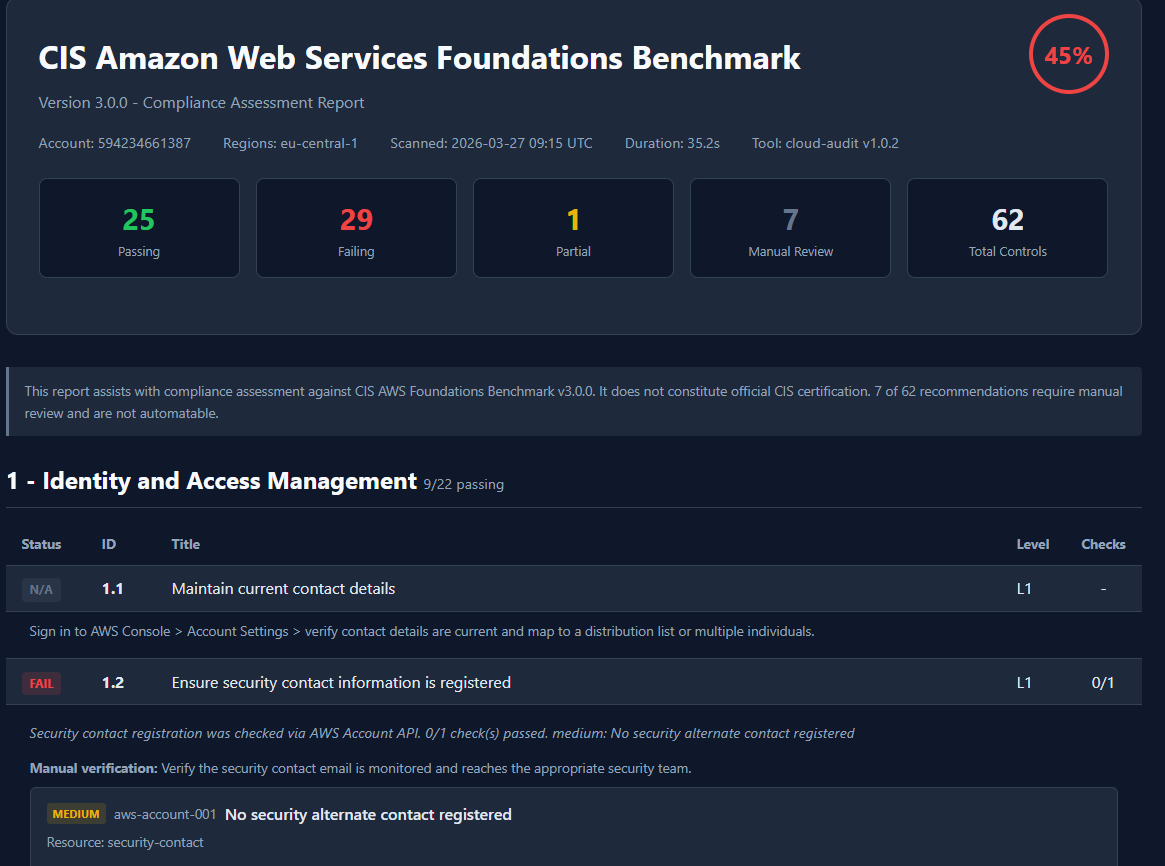
Each failing control shows:
- Evidence statement - what was checked, what was found
- AWS CLI remediation - the exact command to fix it
- Terraform code - HCL you can copy into your infrastructure
- AWS documentation link - the official reference
- Attack chain context - if the failure is part of an exploitable attack path
For example, a failing CIS 1.8 (password policy) shows:
CIS 1.8 - Ensure IAM password policy requires minimum length of 14

Evidence: IAM password policy was verified via GetAccountPasswordPolicy.
         MinimumPasswordLength checked against >= 14. 0/1 check(s) passed.

CLI fix:
  aws iam update-account-password-policy \
    --minimum-password-length 14 \
    --require-symbols --require-numbers \
    --require-uppercase-characters --require-lowercase-characters \
    --password-reuse-prevention 24

Terraform:
  resource "aws_iam_account_password_policy" "strict" {
    minimum_password_length      = 14
    require_lowercase_characters = true
    require_uppercase_characters = true
    require_numbers              = true
    require_symbols              = true
    password_reuse_prevention    = 24
  }
Attack chains in compliance context
Individual CIS benchmark checks operate in isolation. However, the key issue is the combination of failing controls, as these create vulnerable attack paths. Individual findings alone aren’t as bad as their combination. Given today’s technological advancements, it would be a shame not to implement such a feature in cloud auditing. Based on findings, the tool can route results to 20 attack chain rules (describing precisely which ones are included).
For example, if CIS 1.5 (root MFA) fails AND CIS 3.1 (CloudTrail), the scanner will detect error AC-09: Unmonitored administrator access - root has no MFA and there is no audit trail. The compliance report shows which controls are involved and what the remediation priorities are.
This gives auditors and auditees something CIS checklists don’t offer: a risk prioritization view indicating which failures are most important.
How it compares to other tools
| Capability | AWS Security Hub | Prowler (OSS) | cloud-audit |
|---|---|---|---|
| CIS v3.0 controls | 37 automated | 62 | 62 (55 automated) |
| Remediation per control | No | CIS only | Every control (CLI + Terraform) |
| Attack chain detection | No | Paid App only | 20 rules (free) |
| Evidence templates | Via Audit Manager ($) | No | Per control |
| Cost | ~$0.001/check | Free | Free |
| Multi-cloud | No | AWS, Azure, GCP | AWS only |
Prowler is the right choice if you need 41+ frameworks across multiple clouds. cloud-audit is built for teams that want CIS compliance with infrastructure code they can actually apply.
The 7 controls you still need to check manually
These controls cannot be automated via AWS API and require human verification:
- CIS 1.1 - Contact details are current and map to multiple individuals
- CIS 1.3 - Security challenge questions are configured
- CIS 1.7 - Root account is not used for daily tasks
- CIS 1.11 - Access keys were not created during initial user setup
- CIS 1.21 - IAM users are managed via identity federation
- CIS 2.1.3 - S3 data is discovered and classified with Macie
- CIS 5.5 - VPC peering routing uses least-access CIDRs
The compliance report lists these as “N/A” with manual verification steps for each.
Running it in CI/CD
Add CIS AWS Foundations Benchmark compliance gating to your pipeline:
- run: pip install cloud-audit
- run: cloud-audit scan --compliance cis_aws_v3 --format html -o cis-report.html
Exit code 1 means findings detected. The HTML report is attached as a build artifact for auditor review.
For daily drift detection, see the daily-scan-with-diff workflow.
What is next
CIS is the first framework. SOC 2, BSI C5 (mandatory for German government cloud), ISO 27001, HIPAA, and NIS2 are planned - each with the same per-control remediation approach.
Full documentation: haitmg.pl/cloud-audit
The compliance engine, all 80 checks, and the HTML report generator are open source under MIT license: github.com/gebalamariusz/cloud-audit
Related: Prowler vs ScoutSuite: Which AWS Scanner Actually Fixes Issues?