Debugging AWS IAM and Privilege Escalation Using Multi-Model AI
Troubleshooting AWS IAM is painful. When you get an Access Denied error or need to audit a 100-line Trust Policy, pasting the JSON into ChatGPT is tempting, but relying on a single AI model for cloud security is dangerous.
LLMs frequently hallucinate AWS permissions, e.g., inventing s3:ListAllBuckets instead of s3:ListAllMyBuckets or miss subtle privilege escalation paths.
Today, we’re going to look at how to debug IAM issues, spot OIDC vulnerabilities, and write Terraform fixes using Multi-Model Consensus, querying multiple top-tier AI models simultaneously to eliminate hallucinations.
Scenario 1: Access Denied
As covered in a previous post about the causes of access denied, AWS is getting better at telling you why you were denied. But often, especially when dealing with cross-account roles or complex services, you are still greeted with a large encoded STS message.
First, you run the standard CLI command to decode it:
aws sts decode-authorization-message \
  --encoded-message "encoded-string-here" \
  --query DecodedMessage \
  --output text | jq '.'
The output is usually a large, nested JSON blob detailing the exact context keys, resource ARNs, and policy evaluations. Reading this manually takes time. Feeding it to an AI is much faster, but you need to ask the right questions.
For this demonstration, let’s say an application role is trying to read an encrypted file from S3, but it’s failing. You decode the STS message and get this JSON output:
{
  "allowed": false,
  "explicitDeny": false,
  "matchedStatements": {
    "items": []
  },
  "context": {
    "principal": {
      "arn": "arn:aws:sts::111122223333:assumed-role/MyAppRole/session"
    },
    "action": "kms:Decrypt",
    "resource": "arn:aws:kms:us-east-1:111122223333:key/mrk-abc123def456",
    "conditions": {
      "items": [
        {
          "key": "kms:ViaService",
          "values": {
            "items": [
              {
                "value": "s3.us-east-1.amazonaws.com"
              }
            ]
          }
        }
      ]
    }
  }
}
The Prompt:
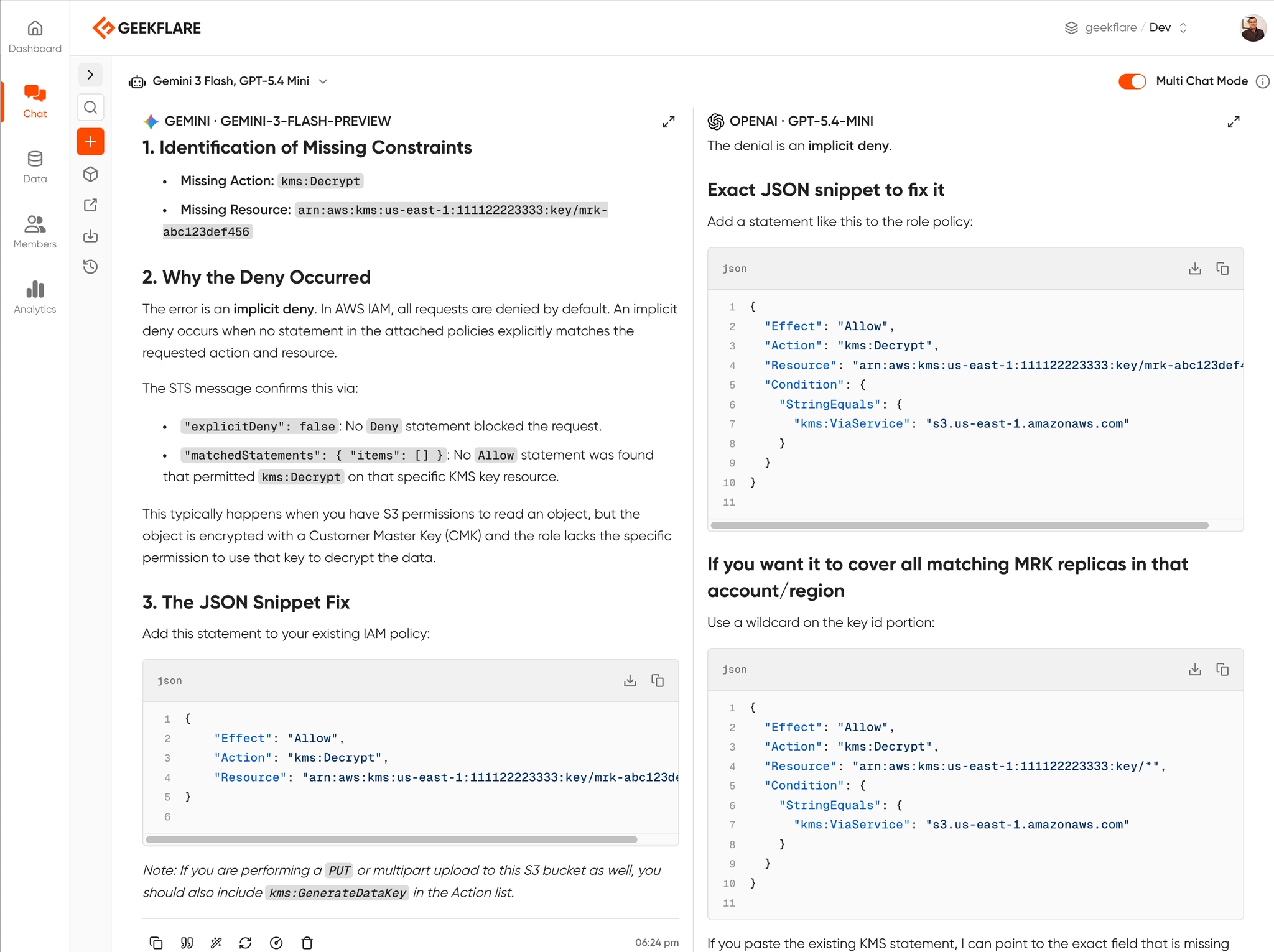
I am receiving an Access Denied error in AWS. Below is the decoded STS authorization message and the IAM policy attached to the role. Do not rewrite the whole policy. Identify the exact missing Action or Resource constraint, explain why the explicit/implicit deny occurred, and provide the exact JSON snippet to fix it.
If you feed this into a single model, you might get a decent answer. But sometimes, ChatGPT might misunderstand an AWS Organizations SCP boundary, while Claude Sonnet identifies it perfectly. This is where comparing outputs saves you hours of debugging.
Here is response from Gemini and OpenAI GPT, side-by-side.
Scenario 2: Spotting Privilege Escalation in OIDC
Let’s look at a real-world security issue: GitHub Actions OIDC backdoors.
Many teams set up OIDC so GitHub Actions can deploy to AWS without long-lived access keys. But a single missing condition key can allow any GitHub user to assume your AWS role.
Look at this Trust Policy:
{
  "Version": "2012-10-17",
  "Statement": [
    {
      "Effect": "Allow",
      "Principal": {
        "Federated": "arn:aws:iam::123456789012:oidc-provider/token.actions.githubusercontent.com"
      },
      "Action": "sts:AssumeRoleWithWebIdentity",
      "Condition": {
        "StringEquals": {
          "token.actions.githubusercontent.com:aud": "sts.amazonaws.com"
        }
      }
    }
  ]
}
This might look secure to you. It restricts the audience (aud) to standard AWS STS.
The Test Prompt:
Review this AWS IAM Trust Policy for a GitHub Actions OIDC integration. Is there a privilege escalation risk? Can any other GitHub repository assume this role? Provide the Terraform code to secure it.
If you run this prompt, you’ll see why multi-model consensus is critical. Some older or smaller models will say, “This looks secure, it uses WebIdentity.”
But an advanced model will immediately flag the missing StringLike condition for token.actions.githubusercontent.com:sub, pointing out that literally any repo on GitHub can assume this role right now.
If you want to catch this type of misconfiguration automatically, open-source tools like cloud-audit can detect OIDC trust policies without sub conditions and generate the Terraform fix for you.
Scenario 3: From Wildcards (*) to Least Privilege
Every cloud environment has that one IAM role. A developer needed to get a Lambda function working quickly, got frustrated with permissions, and slapped s3:* and dynamodb:* on it. Six months later, it’s still in production, and your security audit just flagged it.
You need to scope it down to Least Privilege, but you have no idea what exact API calls the application is actually making. If you guess wrong, you break production.
Instead of guessing, you export the last 7 days of AWS CloudTrail logs for that specific IAM Role session. You then feed the CloudTrail JSON events and the overly permissive policy into the AI.
The Prompt:
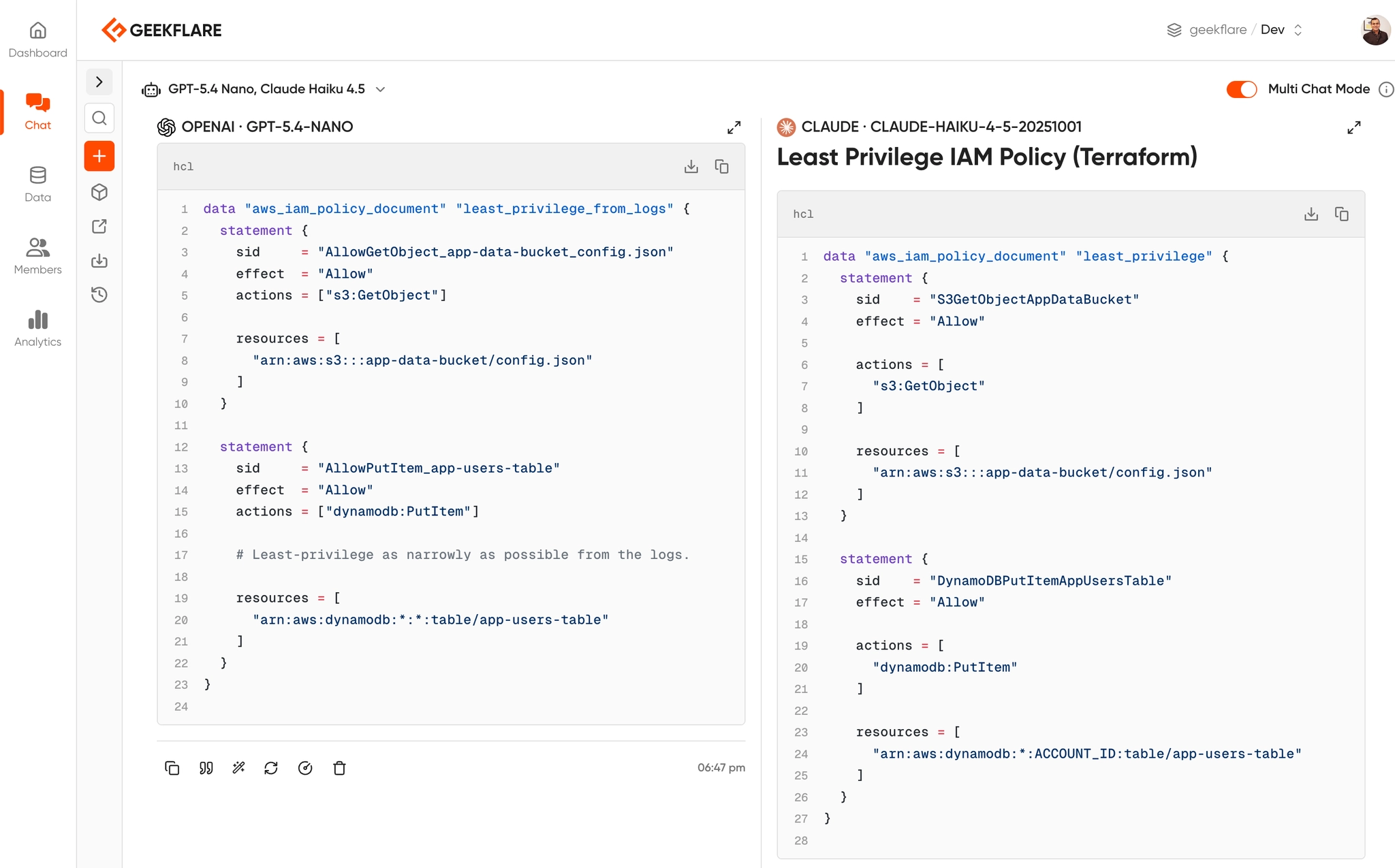
Below is an overly permissive AWS IAM policy containing wildcards (
*), followed by a JSON export of CloudTrail logs showing the actual API calls made by this role over the last 7 days. Rewrite the IAM policy to enforce strict Least Privilege. Only allow the exactActionsandResourcesactively used in the logs. Remove all wildcards. Format the output as a Terraformaws_iam_policy_documentdata source.
This is a high-stakes prompt. If the AI misses a dependency, your app crashes.
If you use a single lightweight model, it might see s3:GetObject in the logs and restrict the policy to just that. But it might fail to realize that the application also requires s3:ListBucket on the parent resource to find the object in the first place.
By running this prompt through multi-model consensus, you can compare the generated Terraform blocks. This time, I am using OpenAI GPT 5.4 Nano and Anthropic Claude Haiku 4.5.
Why Multi-Model Consensus Matters
To do this effectively, you need multiple LLMs. Typically, for cloud engineering, you want:
- Claude 4.6 Sonnet: Arguably the best at writing accurate Terraform and HCL.
- GPT-5: Excellent at parsing complex JSON logic and AWS documentation.
- Gemini 3.1 Pro: Great for larger context windows.
The problem?
Paying $20/month for each of these subscriptions and constantly copy/pasting between three different browser tabs is a terrible workflow.
Instead, I can use Geekflare Chat. It’s an all-in-one AI subscription that lets you chat with every major LLM from a single interface.
I can share the conversation with my teams or make the LLM output public like this and for better efficiency, I can save these prompts for future use.
Best Practices for AI-Assisted Cloud Security
If you are going to use AI to debug your cloud infrastructure, follow these two rules:
1. Sanitize Your Data First
Never paste hardcoded AWS Access Keys, sensitive Account IDs, or proprietary internal IP spaces into any AI prompt. You can use a quick sed command to mask your Account IDs before copying the JSON:
cat policy.json | sed -E 's/[0-9]{12}/111122223333/g' | pbcopy2. AI is a Co-Pilot, Not Autopilot
No matter how confident the AI sounds, never blindly apply its Terraform code. Always run the generated fix through terraform plan and a local static analysis tool like Checkov, Trivy, or cloud-audit to ensure the AI didn’t accidentally introduce a wildcard (*) permission.
Conclusion
Debugging AWS Access Denied errors and auditing IAM policies doesn’t have to be a multi-hour headache. By feeding your decoded STS logs and IAM JSON into multiple AI models simultaneously, you get the equivalent of a senior security team reviewing your code in seconds.
Leveraging multiple AI chat tools like Geekflare Chat drastically reduces debugging time.